
It’s been a few years now, but I still clearly remember a warm April afternoon when a client I deeply admired, professionally speaking, gave me a proper dressing-down.
The reason? I showed up wearing my standard uniform at the time: jeans and a neon-yellow tech T-shirt with Japanese characters. I was extremely proud of it. Everyone else, however, was wearing at least a jacket—some even a tie.
In tech we like to repeat that “in the end, only the code matters.” Or the product, as Uncle Steve taught us with his iconic black turtleneck. Still, a minimum level of respect for the people on the other side of the table never hurts.

As often happens, sooner or later you end up on the other side of the fence, interviewing technically strong candidates in contexts so absurd that hard skills become secondary.
Back when interviews happened in neutral, physical spaces, you could forgive certain things—as long as no one showed up in sweatpants and slippers. Today, with remote interviews from home, the context expands dramatically, sometimes in terrifying ways.
A tech interview can be seen as the combination of several equally important factors: hardware, operating system, network, communication software, physical environment, and—inevitably—the human factor.
Like any distributed system, the overall experience is constrained by its weakest link. And in tech, weak links tend to fail spectacularly.
The machine
We tend to take our computer for granted. Our katana will not fail us at the crucial moment—or so we think.
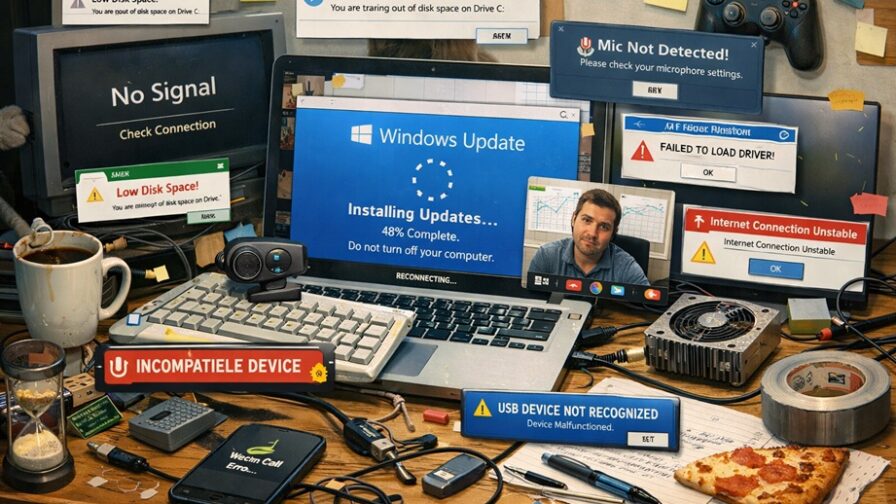
If I had a cent for every time a candidate’s system froze mid-interview, I would be a much richer and far less frustrated developer.
You don’t need the latest MacBook, a 64-GB workstation, or a cutting-edge GPU. You need a machine that is under control.
A computer that starts system updates during the interview, spins its fans at full speed as soon as the call opens, throws notifications on screen, or lags while you speak sends a very clear message: you are a fly on the highway, waiting for the windshield (Genesis, the band—not the Bible).
Basic life-saving maneuvers help more than people think. A clean reboot 30 to 60 minutes before the interview, closing IDEs, Docker, VMs and heavy processes, disabling notifications, and keeping the laptop plugged in go a long way.
If someone doesn’t prepare their machine for a critical event, it’s reasonable to wonder how they handle complex production environments. Disabling notifications, in particular, is mandatory when sharing your screen—accidents caused by pop-ups are incredibly common.
Camera and audio
The webcam is not there for aesthetics. It establishes presence. Unless you’re Christopher Nolan, the rules are simple: the camera should be at eye level, no low-angle shots, face and shoulders visible.
A laptop flat on the table almost always frames badly, no matter how far you tilt the screen. If you don’t have a stand, two books will do. It’s a trivial micro-optimization with a massive impact. Eye contact—even through a screen—still matters.
That said, in about 90% of remote interviews, video is not the real problem. Audio is.
Poor audio breaks the flow, tires the listener, reduces perceived authority, and creates constant friction. Watching grown adults contort their faces trying to decode muffled sounds is exhausting.
A simple wired headset with a decent microphone is often the best option. Expensive wireless headphones are heavy, uncomfortable, and mysteriously always out of battery when you need them most. Bluetooth reliability depends heavily on the computer itself.
Ten-euro wired earbuds may not be trendy and tend to tangle themselves into Gordian knots, but they usually work. Alternatively, a basic USB microphone is excellent if you’re mostly stationary—finally a way to justify those Black Friday purchases.
And choose the quietest room you can. Do not expect people in an open space to lower their voices because you’re on a call. Usually, the opposite happens.
Connectivity and tools
No interview happens without a network. Know where you’ll be and what the connection will be like. Ethernet beats Wi-Fi. Stable Wi-Fi beats last-minute hotspots. Test latency and stability in advance.
Just as important: know which app will be used. Update Teams, Zoom, or Meet beforehand, check audio and video permissions, and do a test call. Nothing destroys credibility and increases anxiety like appearing on screen in full “gasping fish” mode, touching eyes, ears, and mouth in a frantic ritual.
Your physical UI
People notice everything. Your desk is your physical user interface. It doesn’t need monk-level minimalism, but it does need readability.
A solid baseline includes your main computer or monitor, a notebook and pen (yes, even if you let AI take notes—drawing or scribbling helps focus), and water. Unscrewing a bottle is a classic public-speaking trick to buy time.
What to avoid? Visual clutter. Crumpled tissues, grocery bags, cable spaghetti, or overly personal objects. I know your Batman action figure says a lot about you—but if the interviewer is a Marvel fan, like me, you’re already off to a bad start.
An orderly desk communicates control of context, abstraction skills, and respect for the listener. Most importantly, it allows them to focus on you instead of on a book they haven’t read but are now curious about.
Before the conversation even starts, the other side has already processed your background, lighting, and environment.
Neutral walls or an orderly bookshelf work well, with soft, frontal light. What should be avoided at all costs? Beds in the background (yes, I once interviewed a very young candidate in a tank top, with a bed behind him—and what I assume was his girlfriend tossing and turning inside it). Kitchens, unless you’re interviewing for MasterChef. People walking behind you. Glitchy virtual backgrounds that fail every time you breathe.
The background should not tell a story. A Wizard of Oz poster invites interpretations you probably don’t want.
Body language still exists
Even in tech, the body speaks. A hunched back signals disengagement, a lowered gaze suggests insecurity, constant movement communicates stress.
Sit as if you were presenting a technical solution to a client—because that is exactly what you’re doing.
The other side of the coin
A tech interview is never one-way. Candidates evaluate interviewers too: their setup quality, audio and video clarity, respect for time, and genuine attention.
An interviewer with a poor setup implicitly says: “This is how we work, and you are not important enough to deserve my full focus.”
Many strong profiles decide to stop right there. Interviews from cars, gyms, or while crossing the Amazon River look cool only in American movies—or in Verdone films.
Final thoughts
A job interview is, at its core, a simulation of a remote meeting, a collaboration test, and a preview of technical culture.
Preparing your setup and environment reduces friction, builds trust, and communicates seniority.
A good tech professional observes the system, identifies bottlenecks, and optimizes before problems emerge.
Applying this mindset to interviews makes a huge difference and keeps the focus where it belongs.
Unless, of course, you’re like Ben Affleck in Good Will Hunting, showing up to an interview just to ask for cash and disappear. But in that case, it was obvious he was an impostor—those socks gave him away.